How CSS Specificity and the Cascade Work
Part 3 · Frontend Fundamentals
You change a color. Nothing happens. You add a class. Still nothing. You add !important,
it works, you feel a bit dirty, and you move on. Two months later the file has forty of those and
nobody can change anything without breaking something else.
Everyone has done this. It comes from thinking about CSS one rule at a time, when the browser is doing something else entirely: for every property on every element, it gathers all the declarations that could apply and runs a contest to pick one winner. If you know how that contest is judged, the fix is usually one small change instead of an escalation.
The contest, in the order it is actually judged
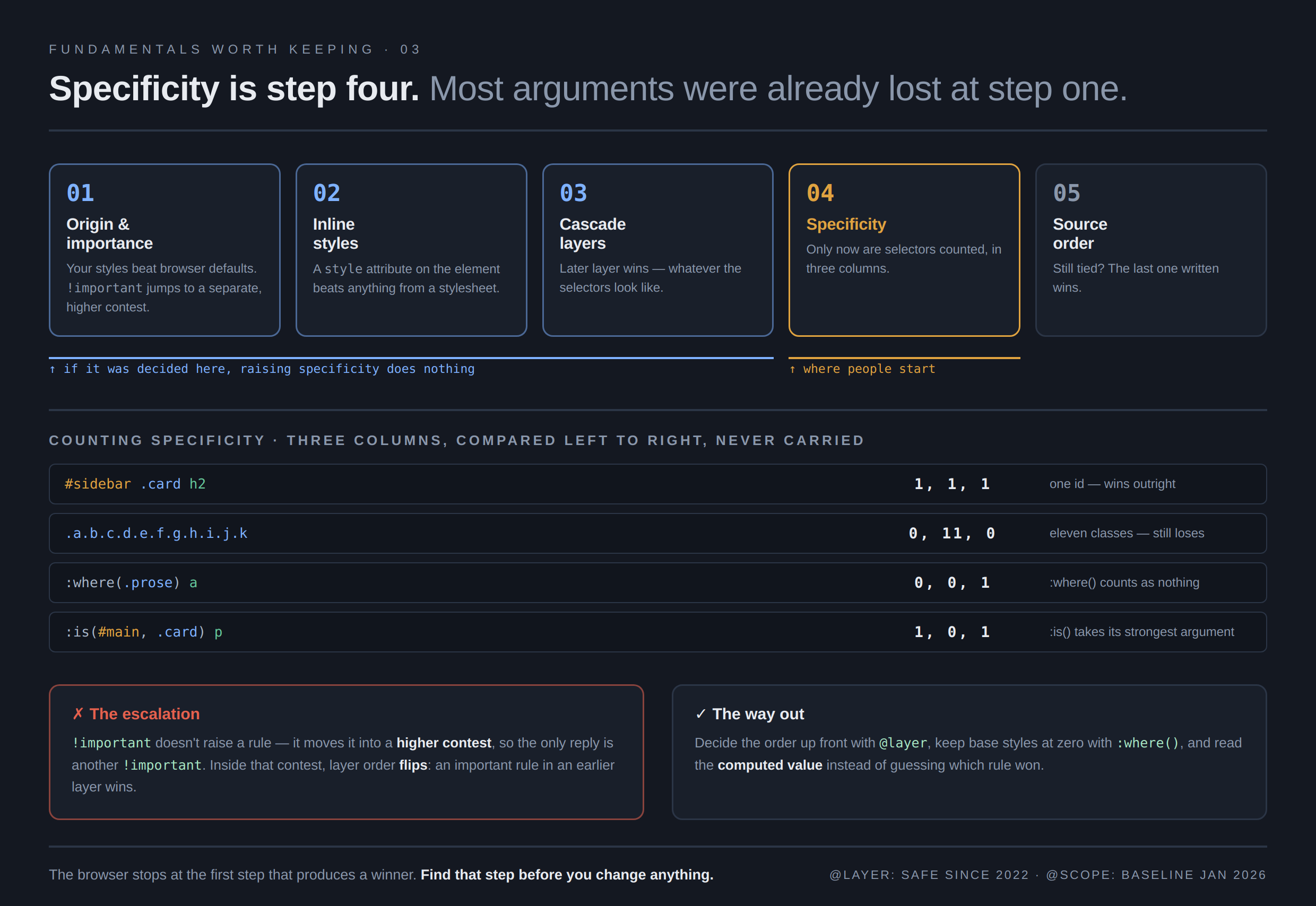
Most people know specificity and assume that is the whole story. It is one step, and it comes late. The browser works down this list and stops as soon as it has a winner.
- Origin and importance. Your styles beat the browser's defaults. Anything marked
!importantjumps to a different, higher contest. - Inline styles. A
styleattribute on the element beats anything from a stylesheet. - Layers. If you use
@layer, the later layer wins, whatever the selectors look like. - Specificity. Only now do we count selectors.
- Source order. Still tied? The last one written wins.
Read that list twice, because it explains nearly every confusing case. If a rule with one class beats your rule with three, no amount of specificity work will help. Something higher up the list already settled it, and you are arguing at the wrong step.
Counting specificity without the folklore
Specificity is three numbers, not one score. Count each selector into three buckets:
- ids:
#header - classes, attributes, and pseudo-classes:
.card,[type="text"],:hover - elements and pseudo-elements:
div,::before
Then compare left to right, and stop at the first difference.
#sidebar .card h2      →  1, 1, 1
.page .card .title     →  0, 3, 0
nav ul li a            →  0, 0, 4
The first one wins, because it has an id and the others have none. Note what does not happen: the
columns never carry. Eleven classes is 0, 11, 0, and a single id still beats it. That is
the piece of folklore worth unlearning: people talk about specificity as though it were a number you
could add up, and it is not.
Two more that catch people out. The universal selector * counts nothing. And
:not(), :is(), and :has() do not count themselves, but they take
the specificity of the most specific thing inside them, so :is(#main, .card) counts as an
id.
Two tools that let you write plain selectors again
The reason specificity turns into a fight is that people raise it to win, and then have to raise it again to win the next one. Two modern selectors let you stop.
:where() counts as zero. Everything inside it is free.
:where(.prose) a { color: var(--link); } /* 0,0,1; trivial to override */That is what you want for defaults and resets. Anything a person writes later beats it without effort, which is exactly the behavior a base layer should have.
:is() groups selectors but takes the highest specificity inside, so use it to shorten
lists, not to lower weight.
:is(h1, h2, h3) + p { margin-top: 0; }Between them, most of my reset and base styles now sit at zero or near it, and I almost never need to raise a selector to beat my own defaults.
@layer is the real fix
Layers let you decide the winning order up front, before specificity is even consulted. You declare the order once, and then a rule in a later layer beats a rule in an earlier one no matter how the selectors compare.
@layer reset, base, components, utilities;

@layer base {
  #article h2 { color: navy; }     /* 1,0,1; high specificity */
}

@layer utilities {
  .text-red { color: red; }        /* 0,1,0; and it wins anyway */
}
That single-class utility beats the id selector, because layers are judged before specificity. This is the thing to reach for when you are fighting a framework or an inherited stylesheet: put their styles in an early layer and yours in a later one, and the fight ends.
Anything not in a layer beats everything that is, which sounds odd until you use it. Unlayered styles are effectively the last layer. It is a sensible default for a small project adding layers gradually.
@layer has been safe to use everywhere since 2022. There is also @scope,
which confines rules to part of the page, and it finished its browser support at the end of 2025 and
reached the safe-to-use mark in January 2026. It is genuinely useful, just newer, so weigh that
against the devices you support.
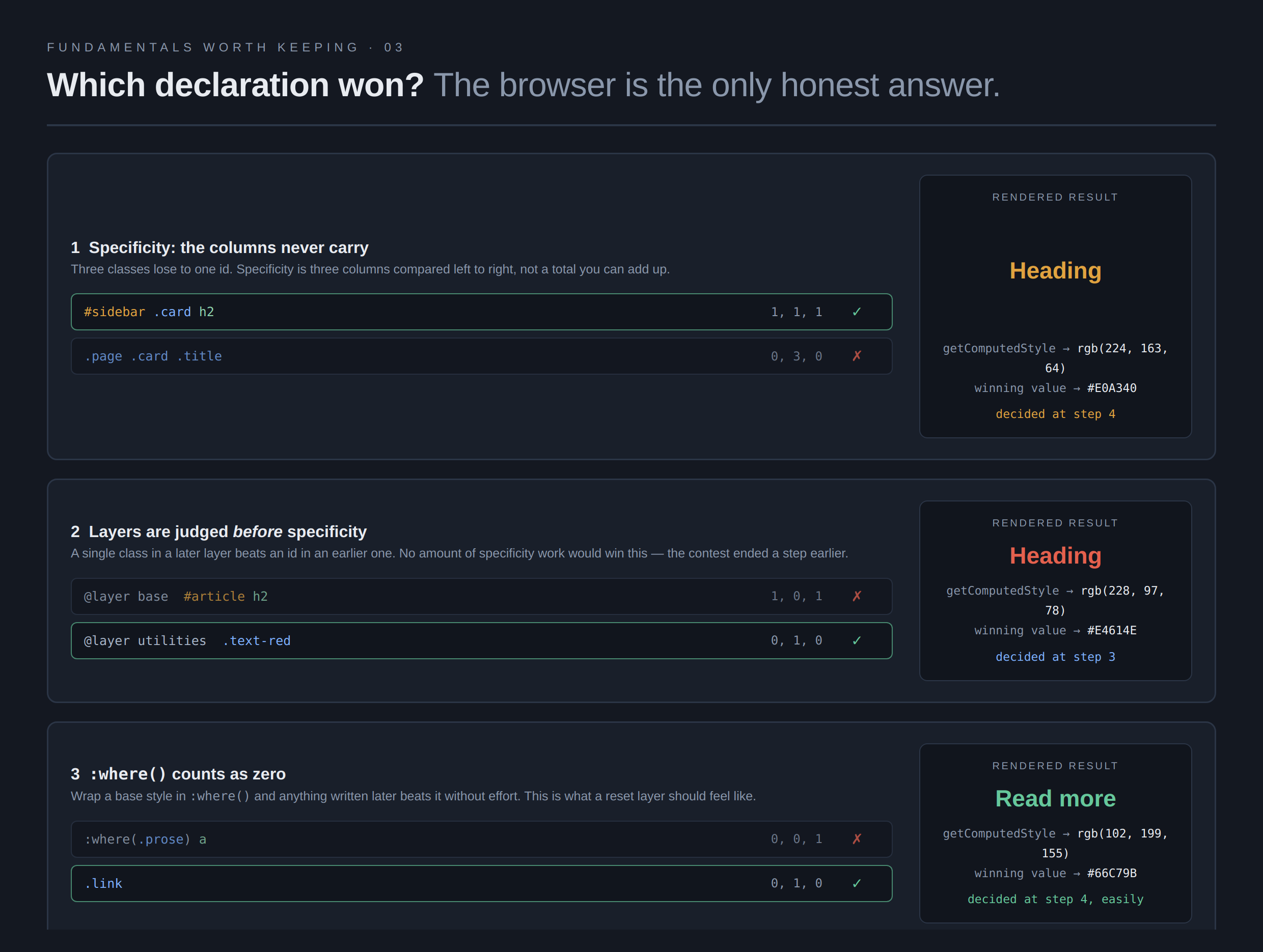
Those three results come from the page itself. It runs getComputedStyle
on each element when it loads and prints the winning color underneath, which is how you can see that
the single-class utility genuinely does beat the id selector.
Where !important actually belongs
!important does not "raise" a rule. It moves it into a separate, higher contest, which
is why nothing normal can beat it and why the only reply is another !important. That is
the escalation, and it is why the file ends up with forty of them.
Inside that higher contest, layer order flips: an important declaration in an earlier layer beats an important one in a later layer. That is deliberate, so a reset layer can hold a line against utilities, but it means you cannot reason about the important cases with the same picture as the normal ones.
I keep it for two things: overriding a third-party stylesheet I cannot edit, and a genuine utility that must always apply. Everywhere else it is a sign I lost the argument at step one and should look higher up the list.
What this has to do with agents
Two things, and both come up constantly.
Agents escalate. Ask one to fix a style that will not apply and you will get !important,
or a longer selector, or both. It works in the moment and it costs you later, because the next change
now has to beat that too. When I see that in a diff, I ask the real question instead: which declaration
is winning, and at which step? Usually the honest fix is a layer, or lowering a base rule with
:where().
Agents also produce selectors that quietly cancel each other out. Ask for a lot of CSS in one pass and you get overlapping rules, one setting section padding by element, another by class, where the winner depends on source order nobody chose deliberately. The page looks subtly wrong and the cause is not visible in any one rule, which is what makes it worth checking the computed value before you start rewriting selectors.
Which is the habit that matters most here. Do not guess which rule won. Open the element in devtools and look at the computed value. The crossed-out declarations tell you the whole story in about five seconds. Every time I have been sure I knew why a style was not applying and skipped that step, I have been wrong.
Asking for it properly
Vague:
The heading color isn't applying, can you fix it?
You will get !important.
Specific:
Don't use
!importantand don't lengthen the selector. Work out which declaration is winning and at which step of the cascade. If it's a base style fighting a component, wrap the base rule in:where()to drop it to zero. If it's a third-party stylesheet, put it in an earlier@layerthan ours. Tell me which step decided it.
That last sentence is the useful one. Asking for the reason gets you a fix that holds, and it tells you whether the agent actually diagnosed the problem or just applied force to it.
The short version
Specificity is three columns that never carry, and it is only step four. Importance, inline styles,
and layers all come first, which is why raising specificity so often does nothing. Keep base styles at
zero with :where(), decide the order
deliberately with @layer, save !important for stylesheets you cannot edit,
and when something surprises you, read the computed value instead of guessing.
That closes this short run on fundamentals. The three pieces (flex or grid, the tab key, and this one) share one idea: knowing the names is what lets you ask for the thing you actually want, from a person or from an agent, instead of approving whatever comes back.